
ContentsFull member profile
For club officials
Full member profile
Keep each rower’s details in one place: first and last names, gender, birth date, licence number, email, phone, address and status.
- Where to find it
- Management › Rowers; module to turn on in Management › Modules
- Available since
- v2.0 (October 2026)
- Module to turn on
- Full member profile. Turned on by the “Full club” profile and by an efa2 import that contains birth dates, emails, addresses or membership numbers.
What it is for
Keep what the club needs to know about its members in the logbook itself, instead of in a separate spreadsheet: contact details, licence number, birth date.
The same information feeds statistics that grant applications ask for, such as the number of women, men, young people and adults who rowed during the season.
In the app
“Adds separate first and last names, gender, birth date, licence number, email, phone, address and status (member, guest, other).”
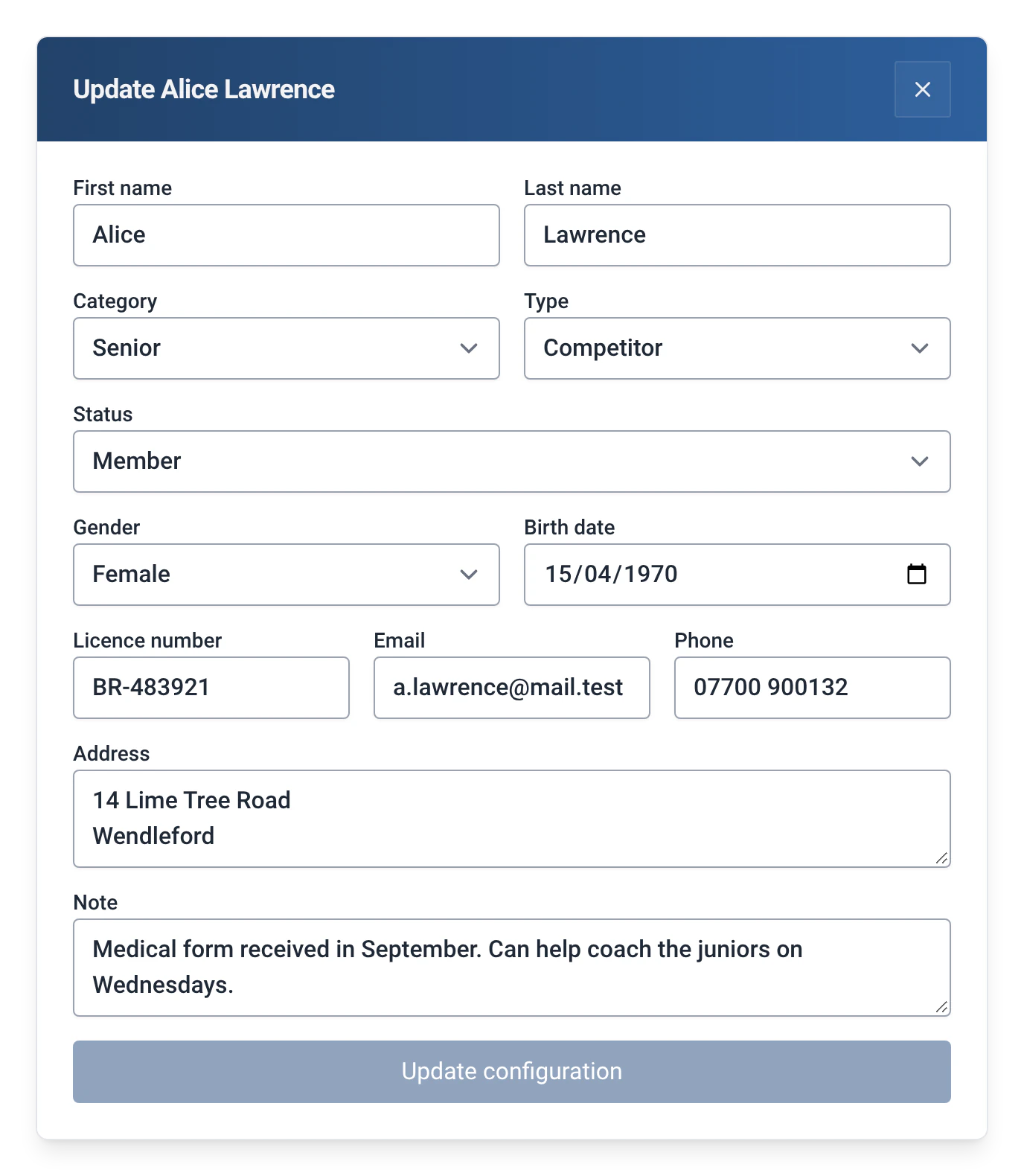
What a rower’s record holds
- “First name” and “Last name”, in two fields. Without the module, the record has a single “Name” field, cut at the first space.
- “Category” and “Type”, which are there with or without the module.
- “Status”: “Member”, “Guest” or “Other”.
- “Gender”: “Not specified”, “Female”, “Male” or “Other”.
- “Birth date”, “Licence number”, “Email” and “Phone”.
- “Address” and “Note”, in free text.
How to use it
- Turn on the module: Management › Modules, with the admin password, then “Full member profile”.
- Open Management › Rowers, then click the pencil on a rower. The “Update …” window now shows all the fields above.
- Fill in what you know, then confirm with “Update configuration”. The button only works once something has changed.
- Rowers added in bulk, one name per line, are created with their name, default category and default type: complete their records afterwards, one at a time.
Where the information is used
| Information | What it is used for |
|---|---|
| Birth date | The “Active members by gender and age” report, asked for in grant applications: young means 18 or under in the year of the outing, from the birth date, otherwise from the category. The Captain module also uses it to tell adults from juniors. See Captain of the crew. |
| Gender | The same report, and the “Kilometer challenge” filter or the grouping of the “Activity by group” report. |
| Status | “Member”, “Guest” or “Other”. Some reports count members only. See Guests and visiting rowers. |
| Email, licence number, address | Exchanged with efa2 (the licence number as the membership number), in both directions. See Switching from efa2, and back. |
| Phone, note | Kept in RowingBeacon only: they are not part of the efa2 exchange. |
Limits and details
- Like all the club’s data, these details are stored on the club’s computer only.
- The “Other” status is neither a member nor a guest. Reports that count members only leave it out, with the note “Only members are counted: guests and other statuses are left out.”
- In the “Active members by gender and age” report, records without a gender or an age are counted as “Not specified”: complete them before sending a grant application.
- The configuration export (Management › Miscellaneous settings › “Export all data”) only contains names, category and type: use a backup or an efa2 export to keep the full records.
- Turning the module off hides these fields without deleting anything: what was typed stays stored and comes back if you turn it on again. See Rowers, boats and routes.