
Migration guide · Rowing Beacon 2.0
Migrate from efa2 to Rowing Beacon
Published on by Mathis Barré, creator of Rowing Beacon · Tested with efa 2.5.3 · Deutsche Fassung · Version française
Rowing Beacon 2.0 imports an efa2 project directly: boats, persons, destinations and every logbook, with nothing to retype. All it needs is a ZIP backup made by efa. The reverse path exists too: Rowing Beacon exports a backup that efa2 can restore, so you can go back or keep efa alongside.
In short
- In efa: Backups › “Create Backup”.
- Install Rowing Beacon 2.0 (Windows or Linux).
- On first launch, choose “I'm coming from efa”, then the ZIP backup.
- Check the numbers shown, then click “Replace and import”.
What Rowing Beacon brings over from efa2
- Boats, with their type and variants (for example 4x / 4-), which become riggings chosen when an outing starts.
- Persons, who become rowers, with their status and, when recorded in efa, gender, date of birth, membership number, email and address.
- Destinations, which become routes, with their distance.
- Every logbook in the project, merged into one history: each outing keeps its original logbook, crew, cox, captain, times, kilometres and comment.
- Outings in progress, which appear under “Boats in use” and are finished in Rowing Beacon as usual.
- Names typed freely, which become guests (rowers) or archived external boats, so the history stays complete.
Rowing Beacon also keeps, without a screen for now, the rest of an efa2 project’s data: reservations, repaired damages, messages, standard crews, waters, outing groups, club work, DRV badges, saved statistics. It is kept as is and written back when you export to efa2, so nothing is lost in a round trip.
The modules your project has data for (Distances, Outing types, Full member profile, Guests, Captain) are turned on by the import. You can turn them off in Management › Modules without erasing any data.
Before you start
- A Windows or Linux computer for Rowing Beacon. efa can stay installed elsewhere: only the backup file travels.
- Administrator access to efa, to create the backup.
- If Rowing Beacon already holds data, it will be replaced. A backup is made automatically just before the import, and can be restored in Management › Data.
Step 1: create a backup in efa
Open the efa admin panel (when efaBase starts, or with the “Admin Mode” button in the efa Boathouse), then click “Backups” in the File column. In the “Create Backup” tab, leave “Save Configuration Data” and “Save Project” ticked, then click “Create Backup”. efa tells you where it saved the file, named for example efaBackup_20261027_124231.zip.
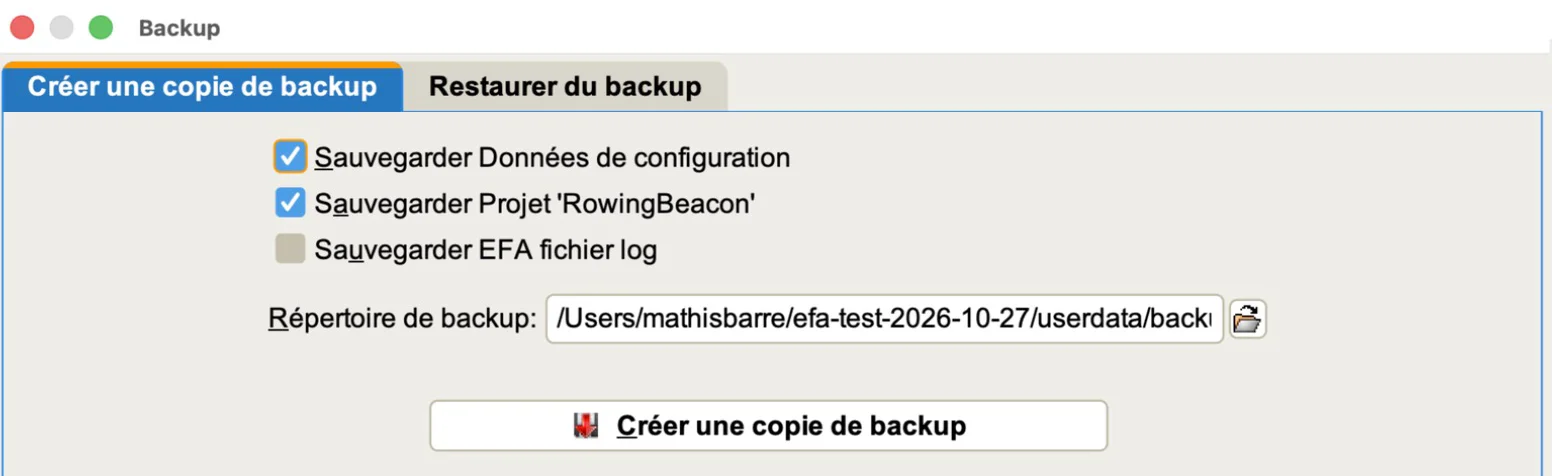
The screenshots on this page show the French interface; the labels in the text match the English version. Instead of the ZIP, you can also point directly to efa’s data folder: the one holding the .efa2project file.
Step 2: import the project into Rowing Beacon
Download Rowing Beacon 2.0 and launch it. On first launch, choose the “I'm coming from efa” profile, then your ZIP backup or data folder. If Rowing Beacon is already set up, go through Management › Data › efa2 › “efa ZIP backup…” or “Data folder…”.

Step 3: check before importing
Before writing anything, Rowing Beacon shows what it found: the number of boats, rowers, routes and outings, the logbooks involved, outings in progress, and guests created for names typed freely. Compare with efa, then click “Replace and import”.
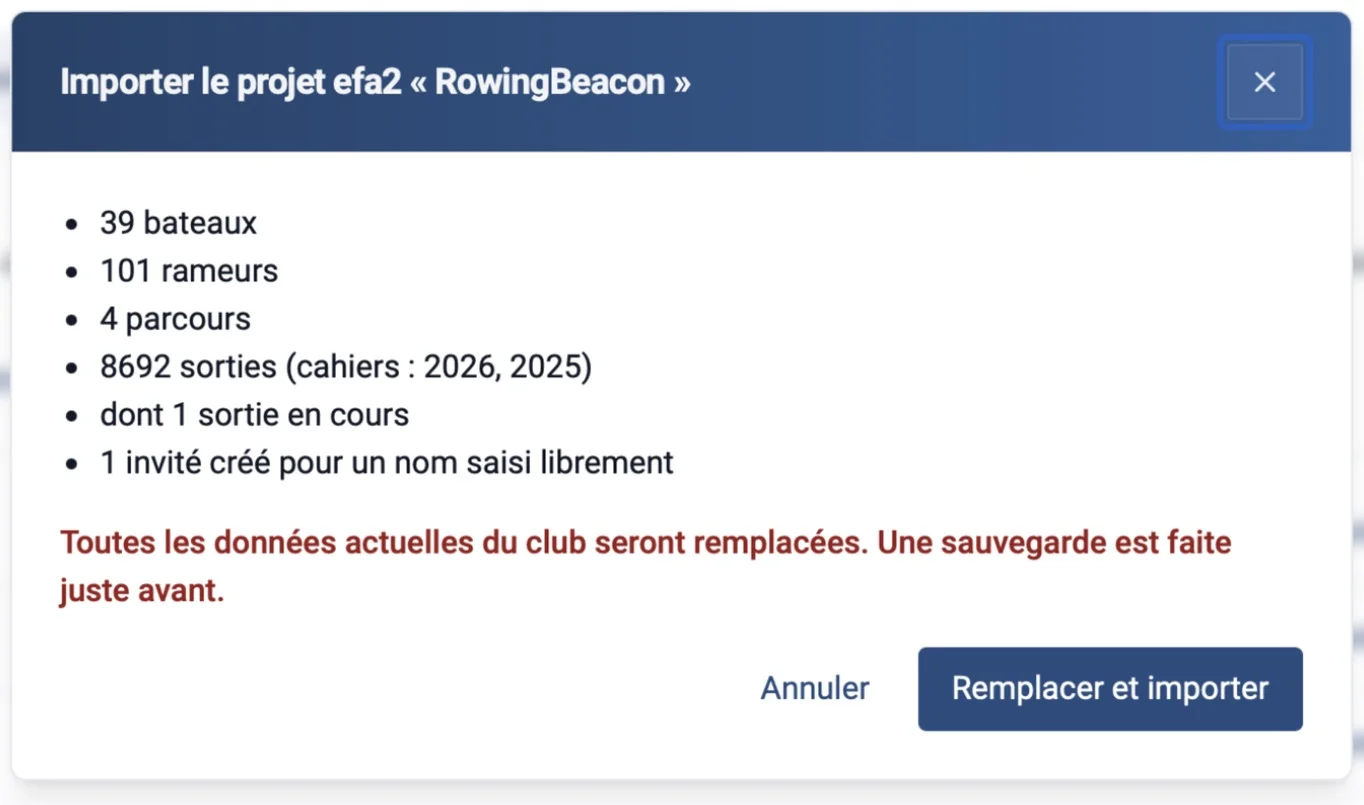
In our test, on a demo club with anonymised names, the preview announced 39 boats, 101 rowers, 4 routes and 8,692 outings across the 2025 and 2026 logbooks. After the import, a coxed pair outing left in progress in efa appeared among the boats in use, with its cox, its captain and a guest typed freely; a finished outing kept its times, its route, its 8 km and its comment.
Going back to efa2, or keeping both
In Rowing Beacon, Management › Data › efa2 › “Export” creates a ZIP backup in efa2 format, with everything that was imported and the outings recorded since. In efa, open Backups › “Restore from Backup”, choose that file, then restore. efa shows the backup’s contents before restoring it.
We checked this round trip with efa 2.5.3: a club exported from Rowing Beacon was restored into efa, two outings were recorded there, then the project came back into Rowing Beacon with the same numbers of boats, rowers and routes, plus those two outings.
Limits to know
- The import replaces all current Rowing Beacon data (a backup is made just before). It does not merge two clubs.
- Only efa2 projects (efa 2.x) are read. efa 1.x data is not.
- Rowing Beacon and efa2 do not sync: each move from one to the other goes through a backup and replaces the data entirely.
- An outing left open in efa before the day of the import is finished by the import, with a note in its comment.
- When exporting to efa2, Rowing Beacon incidents are not carried over (efa2 has no equivalent), and a crew of more than 24 rowers or with several coxes is cut. Rowing Beacon tells you when you export.
- Your club’s own outing types turn into “normal Session” if you restore the export into a fresh efa without your configuration.
- Rowing Beacon Desktop is available for Windows and Linux.
Frequently asked questions
Does the import change my efa data?
No. Rowing Beacon reads a copy: a ZIP backup made by efa, or efa’s data folder. efa and its files are left untouched. You can keep using efa while you try Rowing Beacon.
Can I import more than once?
Yes. Each import replaces the Rowing Beacon data with the efa project, after an automatic backup. Because the efa IDs are kept, a new import lands on the same boats, persons and outings.
What happens to data efa knows about but Rowing Beacon does not show?
It is kept as is (reservations, repaired damages, messages, standard crews, waters, outing groups, club work, DRV badges, saved statistics) and written back into the file when you export to efa2. It has no screen in Rowing Beacon yet.
Can I go back to efa2 after migrating?
Yes. Management › Data › “Export to efa2” creates a ZIP backup that efa2 restores with File › Backups › “Restore from Backup”. Outings recorded in Rowing Beacon in the meantime are included.
Does the import work with an old efa backup?
You need an efa2 backup that contains the project, with its boats and persons. A partial backup (without boats or without persons) is refused, so the club data is not erased.
Is Rowing Beacon free?
Yes. Rowing Beacon Desktop is free and its source code is published on GitHub.