
ContentsThe outing logbook
For club officials
The outing logbook
Every outing of the club, with its crew, times and comments. A forgotten outing can be added and a wrong one corrected.
- Where to find it
- Logbook
- Available since
- the first versions (2024)
- Module to turn on
- None
What it is for
Find out who went out, when, in which boat, and what was noted.
How to use it
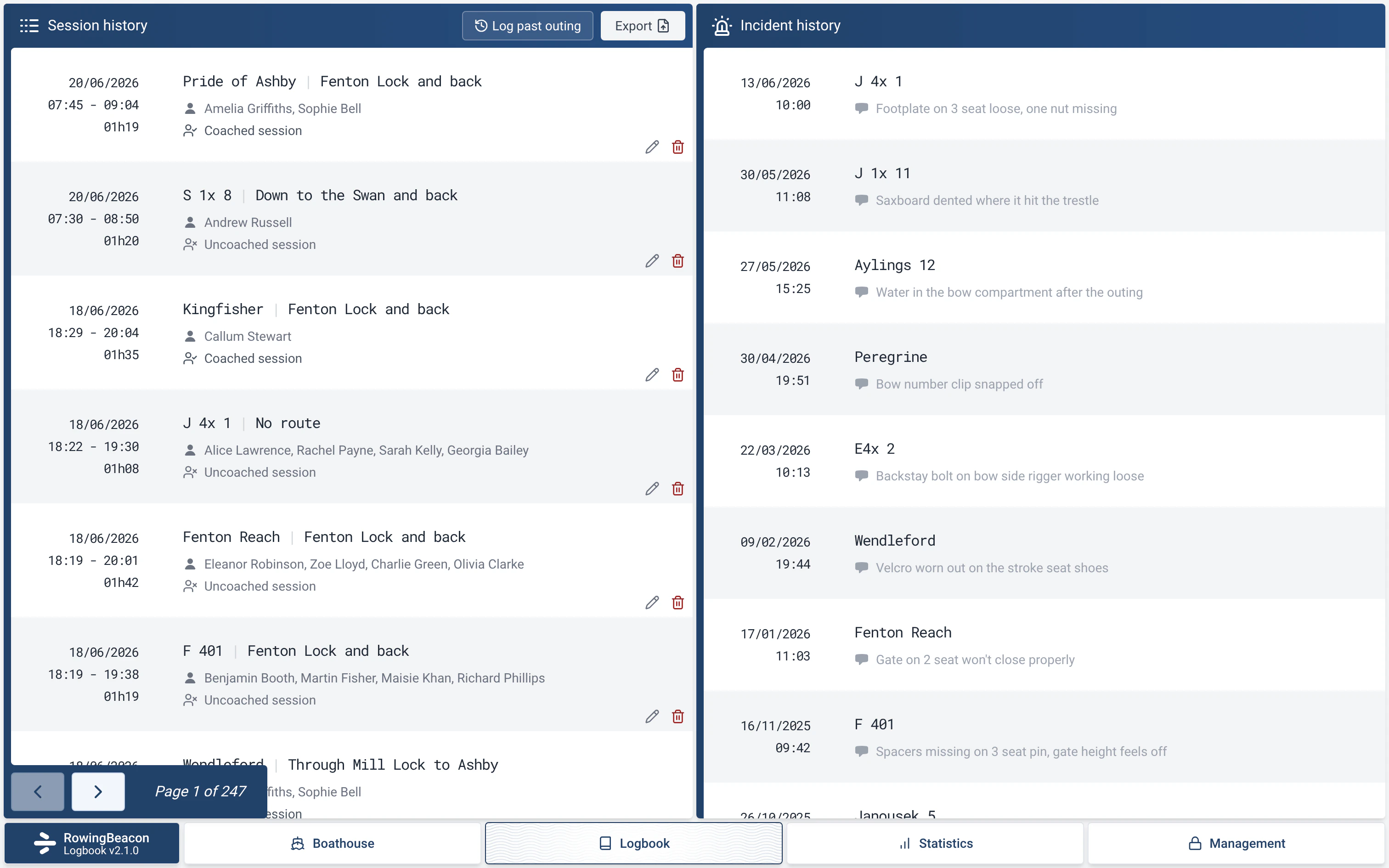
- Open the Logbook tab. The “Session history” is shown page by page.
- Each outing keeps its date, boat, crew (the cox is marked), route, times, comment and coaching. With the Distances, Outing types and Captain modules, the distance, the type of outing and a “Captain: …” line are added.
- To the right of the outings, the “Incident history” gathers the incidents reported on return. With the Damages module, a “Damages” tab is added. See Boat damage reports.
- The “Log past outing” button adds a forgotten outing, and the pencil next to each finished outing corrects it. See Log a past outing or correct one.
- The “Export” button saves the history to a file. See Exporting outings.
Limits and details
- An outing entered by mistake is corrected with the pencil, or deleted with the bin icon. Both ask for the admin password. Deleting does not trigger an automatic backup.
- Archiving a boat, a route or a rower does not change outings already recorded.
- After an efa2 import, all the efa logbooks are brought together in one history; each outing keeps its original logbook.