
ContentsOuting types
At the pontoon
Outing types
Say whether an outing is training, a regatta or a tour, and log outings over several days. The type shows in the logbook, the exports and the statistics.
- Where to find it
- Boathouse › Start session and Logbook; module to turn on in Management › Modules
- Available since
- v2.0 (October 2026)
- Module to turn on
- Outing types. Turned on by the “Full club” profile and by an efa2 import that contains outings of a type other than “Regular outing”.
What it is for
Tell a regular outing from a training session, a regatta or a tour, and find it again afterwards in the logbook and the statistics, without reading every comment.
The module also allows outings over several days, such as a tour or a training camp, with an expected return date and time.
In the app
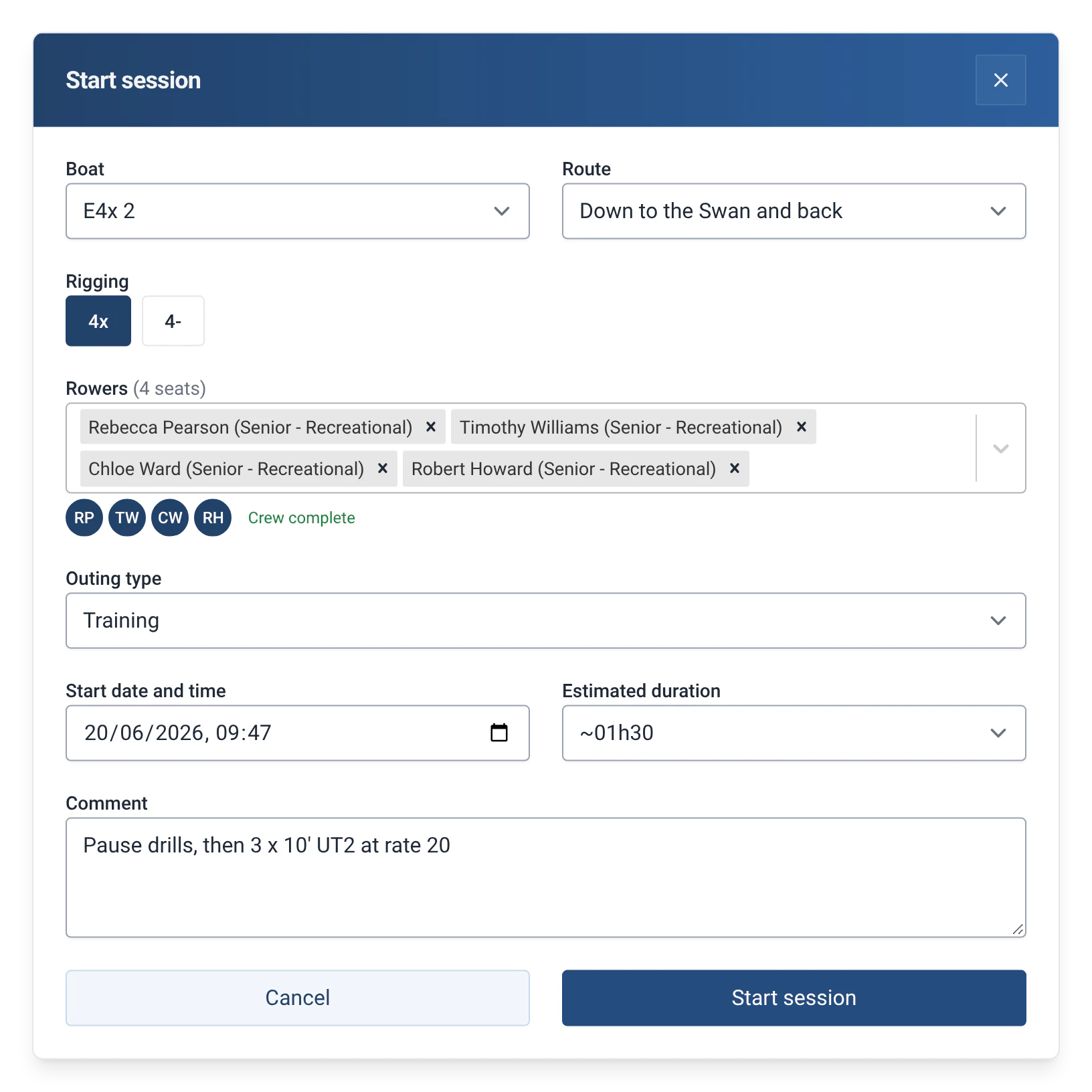
“Adds a type choice at departure, an end date for outings over several days, and the type in the logbook and exports.”
What the module adds
- At departure, an “Outing type” list in the “Start session” window. It stays on “Regular outing” unless the crew changes it.
- In the “Estimated duration” list, a “Several days” choice, which opens an “Expected return” field with a date and a time.
- In the logbook, the type appears as a small label next to the boat, the route and the distance.
- The same list is in the “Log past outing” and “Edit outing” forms, so the type can be changed afterwards.
How to use it
- Turn on the module: Management › Modules, with the admin password, then “Outing types”.
- At departure, in “Start session”, choose the “Outing type” from the list.
- For an outing over several days, choose “Several days” in “Estimated duration”, then fill in the “Expected return”.
- To change the type of an outing that has already taken place, use the pencil on its line in the Logbook, which asks for the admin password. See Log a past outing or correct one.
- For the figures, open the “Outing types” report in Statistics: outings, kilometres and hours per type. The “Activity by group” report can also group by outing type. See The 29 statistics reports.
Limits and details
- The nine types are: Regular outing, Training, Regatta, Training camp, Instruction, Tour, Club trip, Ergometer and Motorboat. The club cannot add its own to the list.
- In the statistics, an outing recorded without a type counts as “Regular outing”. Outings over several days are not counted in hours.
- Without the module, the “Outing types” report is shown as unavailable, with a button to turn the module on. The “Several days” choice is only offered at departure: when logging a past outing, you enter the end date and time directly.
- The type is a column of the exported files. See Exporting outings.
- The type is exchanged with efa2: it is read on import and written back on export. If the project contains outings of a type other than a regular outing, the import turns the module on. See Switching from efa2, and back.
- Turning the module off hides the list and the label without deleting any type: they come back if you turn it on again. See Rowers, boats and routes.