
ContentsGuests and visiting rowers
At the pontoon
Guests and visiting rowers
Type a visitor’s name at departure and go out, without adding them to the rower list. Their outings stay in the logbook and the statistics.
- Where to find it
- Boathouse › Start session and Management › Rowers; module to turn on in Management › Modules
- Available since
- v2.0 (October 2026)
- Module to turn on
- Guests. Turned on by the “Full club” profile and by an efa2 import that contains guests or names typed freely.
What it is for
Welcome a visiting rower, a friend on a taster session or someone from another club without creating a member each time. The name is typed at departure, and that is all.
The guest’s outings stay in the logbook. The record can be completed later or turned into a member.
In the app
“A name typed at departure creates a “guest” record hidden from the rower list; its outings stay in the logbook and the record can later be completed or turned into a member.”
What the pontoon sees
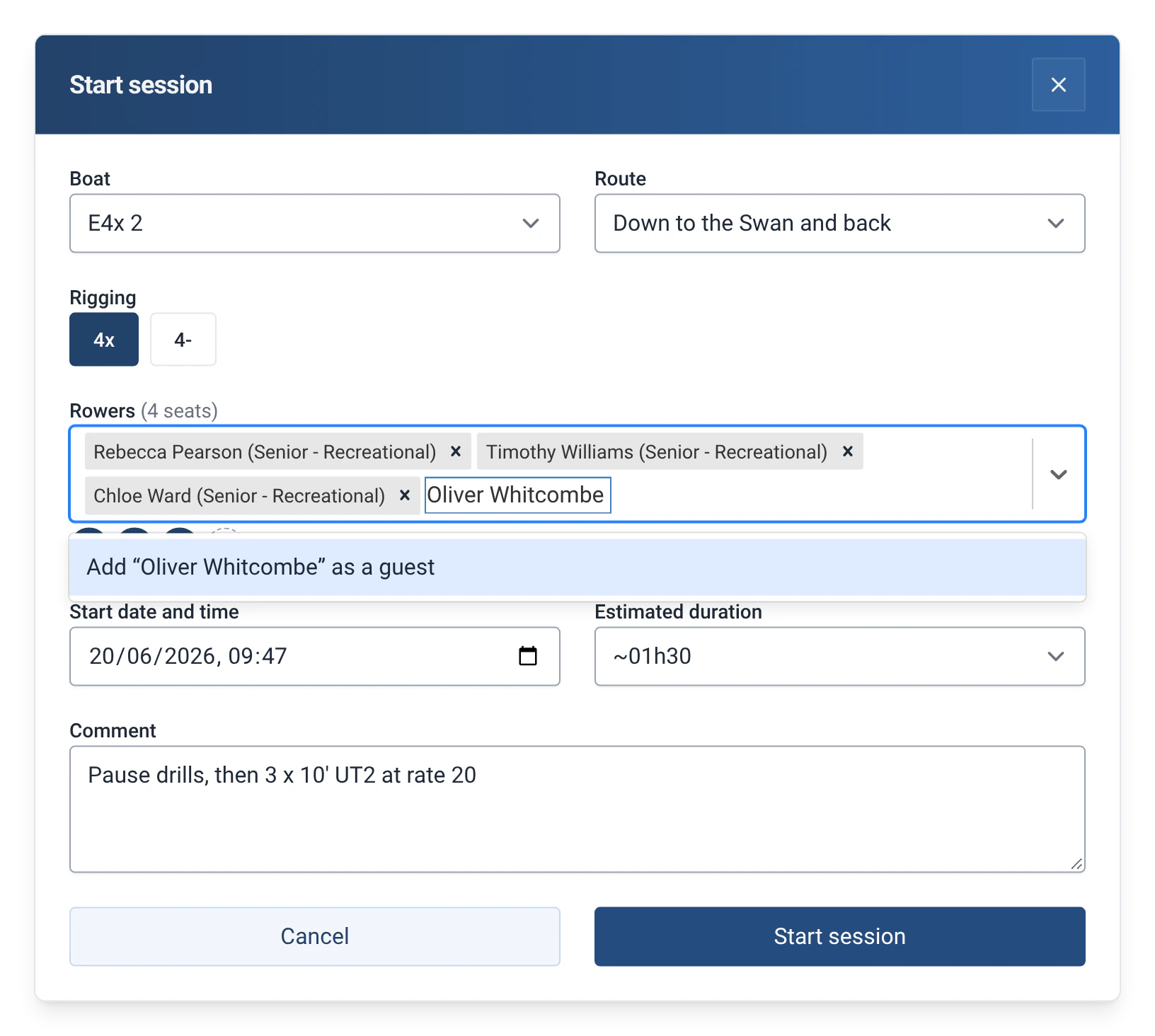
- In the “Rowers” or “Cox” field, a name that matches nobody is offered as “Add “…” as a guest”. In the crew, the guest appears with “(guest)” after their name.
- A name that is a member’s picks that member. The comparison ignores accents, capital letters and extra spaces. Typing a guest’s name again gives the same guest back, even if the record has been archived.
- A guest has no level to check: a boat’s minimum level never warns or blocks because of a guest.
- Guests are not offered in the list of rowers: to take one out again, type their name again.
How to use it
- Turn on the module: Management › Modules, with the admin password, then “Guests”.
- At departure, in the “Rowers” field (or “Cox”), type the visitor’s name and choose “Add “Name” as a guest”. The guest record is created when the outing starts.
- The “Log past outing” and “Edit outing” forms work the same way.
- To see the guests, open Management › Rowers and choose “Guests” in the list next to “Rowers”: the number of guests is shown, for example “Guests (3)”.
- To complete a guest’s record or make them a member, click the pencil, then set the “Status” to “Member”. The guest then joins the list of rowers.
Limits and details
- The “Status” of a rower can be “Member”, “Guest” or “Other”. To fill in more than the name (email, licence number, birth date…), turn on the Full member profile module. See Full member profile.
- In the statistics, the “Guests” report counts the guests’ participations per month, the number of different guests and their share of the club’s activity; it needs the module. “Outings per rower” can be filtered by status. The “Active members by gender and age” report counts members only. See The 29 statistics reports.
- A guest is never suggested as captain, but can be named by hand.
- The configuration export (Management › Miscellaneous settings › “Export all data”) leaves the guests out: it only contains the club’s members.
- Names typed freely in efa2 become guests on import, and so does a name that matches several records. The “Guest” status is exchanged in both directions, and the import turns the module on. See Switching from efa2, and back.
- Turning the module off stops new guests being created. The guests that already exist stay in Management › Rowers and in the logbook. See Rowers, boats and routes.