
ContentsThe 29 statistics reports
For club officials
The 29 statistics reports
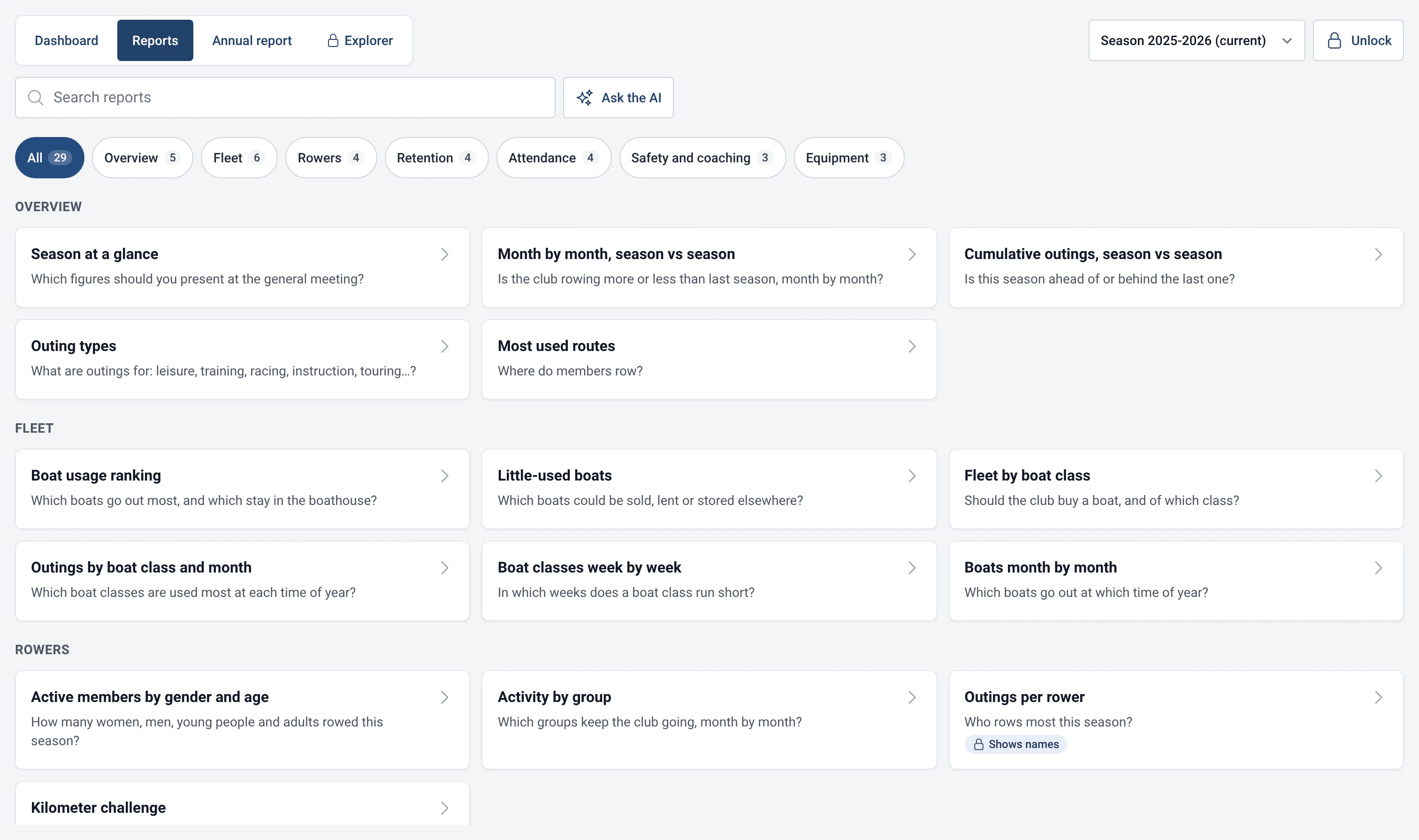
29 ready-to-read reports in 7 themes: boat ranking, busy times, retention, coaching, a saturated fleet, kilometre challenge.
- Where to find it
- Statistics › Reports
- Available since
- version 2.1 (2026)
- Module to turn on
- None. Four reports need a module: Distances, Outing types, Guests or Damages.
What it is for
Answer the questions club officials ask themselves: which boats stay in the boathouse, which slots are busy, does the club need another boat, do new members stay, which outings are coached.
Each report starts with the question it answers, then gives a chart and a table. “How to read this report” explains in a few sentences what the chart shows and how it is counted.
A few concrete reports
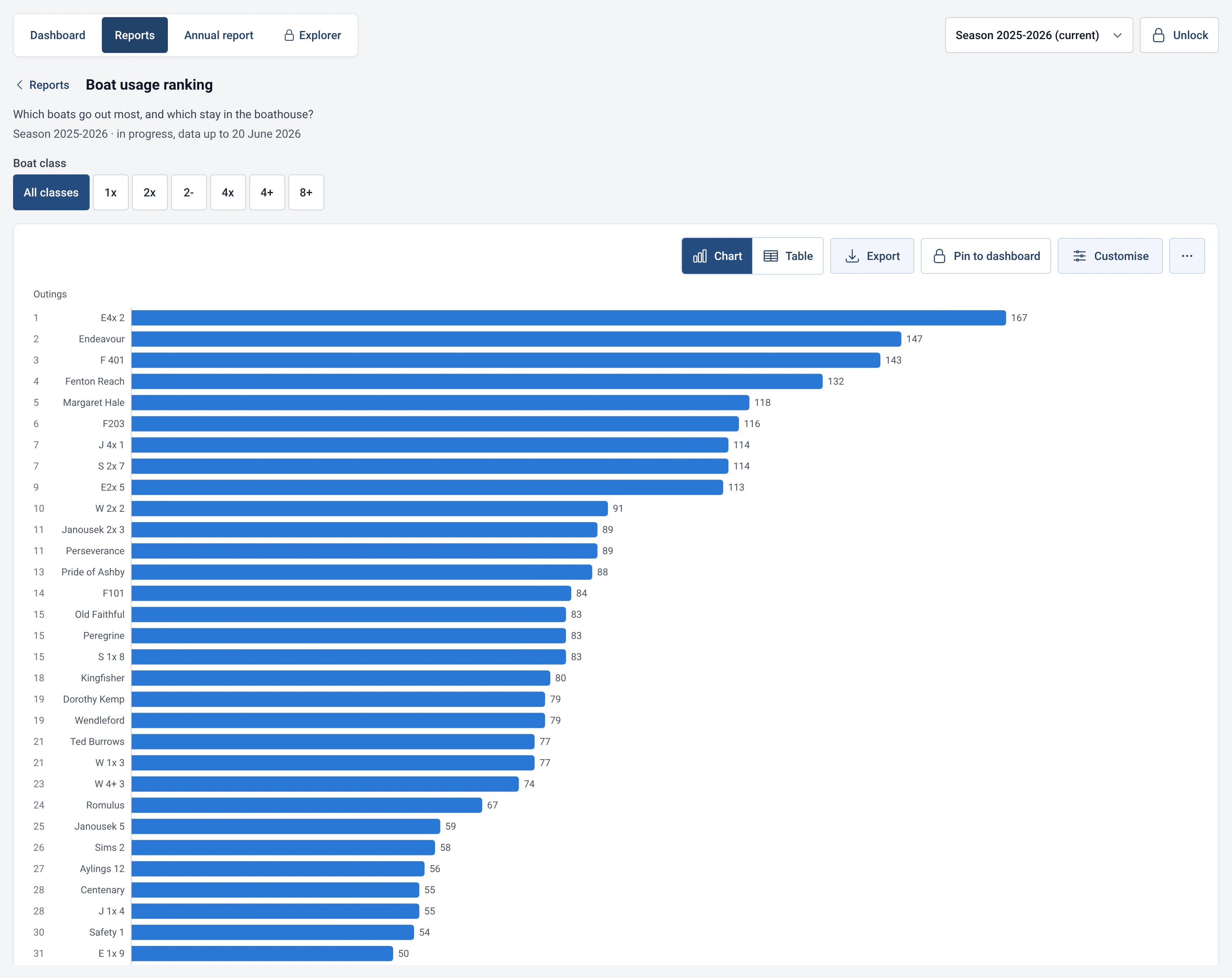
- Boat usage ranking: outings, days in use, hours and kilometres for each boat, including those that never went out. Tied ranks are shown.
- Boats month by month: one row per boat, one column per month, to see who goes out when and pick the right time for maintenance.
- Busy days and hours: the average number of rowers or outings per week, by day and start time. Ideal for spotting the busiest slot, or the one with room to spare.
- Season calendar: participation day by day, to spot quiet spells, holidays and the effect of the weather.
- Fleet by boat class: the days when every boat of a class was out, the peak number out at the same time, and outings per boat. It helps you decide whether you are short of a single scull or a four.
- Retention by joining season: as a heatmap, the share of the members who joined in a given season who are still rowing in the following seasons. “New member retention” gives the same thing 1, 2, 3, 6, 9, 12, 18 and 24 months after the first outing.
- Coaching balance: the share of coached outings for each member, from least to most coached. Are all the beginners getting a share?
- Kilometer challenge: the ranking of kilometres rowed on the water this season, ergometer excluded, which can be filtered by gender and age category.
- Active members by gender and age: the table that grant applications often ask for.
Using the reports
- Open Statistics › Reports. The catalogue sorts the reports by theme. Type in “Search reports” to filter, or pick a theme under “Themes”.
- Click a report to open it. Set its parameters above the chart (season, boat type, period, filter): it recalculates at once.
- “Show table” and “Show chart” switch between the two views. “Export” offers CSV (raw data), Excel (.xlsx), an image (PNG) and printing or saving as a PDF.
- “Pin to dashboard” adds the report to the dashboard (see Customisable dashboard).
- If your search finds no report, the catalogue offers “Ask the AI”: the assistant writes the statistic for you (see AI assistant and MCP server).
Settings
- Customise: on a report, this button changes the chart type (bars, lines, areas, pie, heatmap, calendar, table), the values shown, the sort order, stacking and the maximum number of bars. These settings only change the display and last until RowingBeacon is closed. To keep them, pin the chart to the dashboard or save it as a query.
- Reports that show names: three reports display rowers’ names (“Outings per rower”, “Kilometer challenge”, “Coaching balance”). They carry the “Shows names” badge and are locked until the admin password is entered. In Management › Statistics and AI, the “Rankings” option lets you show them to everyone at the boathouse.
- Reports for officials: “Regular members who stopped coming” and “Outings to check” carry the “Officials” badge.
- Unavailable reports: a report that needs a module that is off appears with the reason, for example “Needs the "Distances" module”, and a “Turn on the Distances module” button. The module can be turned off at any time in Management › Modules, with no loss of data. See Rowers, boats and routes.
- Slow to compute: three reports go through the club’s whole history (“Retention by joining season”, “New member retention” and “Regular members who stopped coming”). They carry this badge and can take a few seconds on a small computer.
The 29 reports, by theme
| Theme | Reports |
|---|---|
| Overview (5) | Season at a glance; Month by month, season vs season; Cumulative outings, season vs season; Outing types; Most used routes. |
| Fleet (6) | Boat usage ranking; Little-used boats; Fleet by boat class; Outings by boat class and month; Boat classes week by week; Boats month by month. |
| Rowers (4) | Active members by gender and age; Activity by group; Outings per rower; Kilometer challenge. |
| Retention (4) | Retention by joining season; New member retention; Member attendance; Regular members who stopped coming. |
| Attendance (4) | Active and new rowers per month; Guests; Busy days and hours; Season calendar. |
| Safety and coaching (3) | Coaching balance; Safety month by month; Outings to check. |
| Equipment (3) | Boat wear; Incidents per boat; Damage per boat. |
Limits and details
- The modules concerned: Outing types (“Outing types”), Distances (“Kilometer challenge”), Guests (“Guests”) and Damages (“Damage per boat”).
- Each report recalls what is counted: outings over several days are not counted in hours, motorboat outings are not counted among rowers’ outings, and boats and rowers excluded from statistics are ignored.
- When information is missing from the records (distance, gender, birth date, coaching), the report shows the percentage filled in next to it, for example “Distance known for 80% of outings”.
- If you are curious about a report’s SQL, open it in the Explorer with “View SQL query” (admin password). See Read-only SQL Explorer.