
ContentsCaptain of the crew
At the pontoon
Captain of the crew
Name the person responsible for each crew at departure. The cox, or else the first adult rower, is suggested, and the captain shows in the logbook.
- Where to find it
- Boathouse › Start session; module to turn on in Management › Modules
- Available since
- v2.0 (October 2026)
- Module to turn on
- Captain. Turned on by the “Full club” profile and by an efa2 import that contains outings with a captain.
What it is for
Know who was in charge of the crew on each outing, for example when juniors go out or after an incident, without relying on memory.
The captain is picked among the people in the crew, cox included, with one click at departure.
In the app
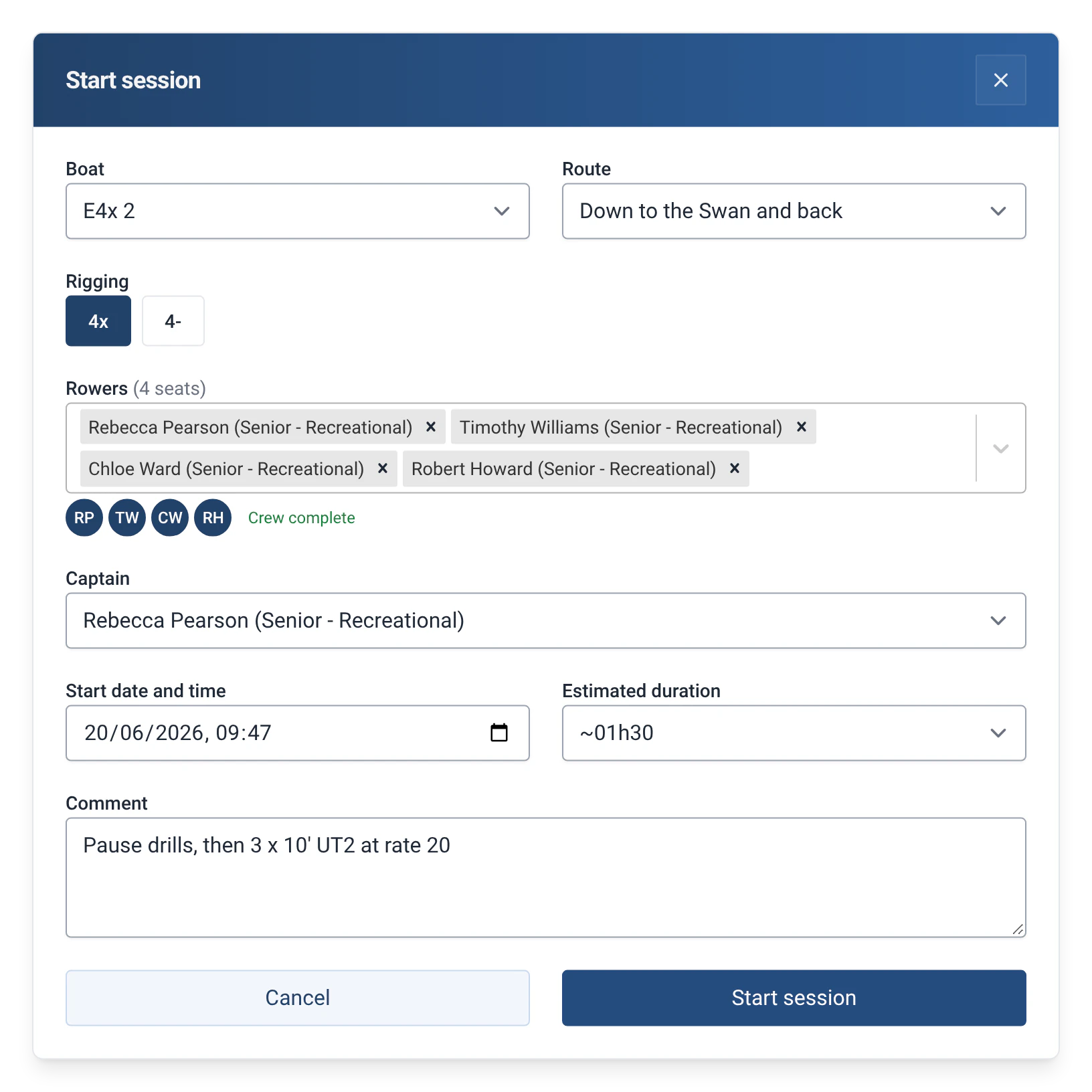
“Adds a captain choice among the crew at departure (the cox, otherwise the first adult rower, is suggested), shown in the logbook and exports.”
What the pontoon sees
- At departure, a “Captain” list in the “Start session” window offers the people in the crew, and “None”.
- A captain is suggested as the crew is filled in: the cox if there is one, otherwise the first adult rower in the list. Adult means 18 or over from the birth date, otherwise the “Senior” category; a rower with neither is considered an adult. A guest is never suggested.
- The suggestion follows the crew until someone chooses. Once the captain is chosen by hand, the choice is kept, “None” included, unless that person leaves the crew.
- In the logbook, a “Captain: …” line is added to the outing.
How to use it
- Turn on the module: Management › Modules, with the admin password, then “Captain”.
- At departure, fill in the crew. The “Captain” list is next to the “Outing type” list if that module is on. Check the person suggested, or choose another.
- To make a captain compulsory, tick “Require a captain to start an outing” in the Captain module’s card, in the same page. Without a captain, the app answers “Choose a captain from the crew.”
- The “Log past outing” and “Edit outing” forms have the same list, and the same rule if it is compulsory. See Log a past outing or correct one.
Limits and details
- The captain must be one of the people in the crew. A guest can be named captain by hand.
- The captain is a separate notion from the cox, who is logged in his or her own field. See Cox and riggings.
- The captain is in the exported files, with their name. See Exporting outings.
- The statistics have no report on captains yet. In the SQL Explorer, the outing-by-rower view has a “Captain” column, which can be used in your own queries.
- The captain is exchanged with efa2: the captain of an imported outing is kept, and written back on export. See Switching from efa2, and back.
- Turning the module off hides the list and the “Captain: …” line without deleting any captain: they come back if you turn it on again. See Rowers, boats and routes.