
ContentsAutomatic backups
Your data
Automatic backups
A copy of the club’s data at start-up, then every 24 hours, and before every import, restore, deletion or update.
- Where to find it
- Management › Data
- Available since
- v2.0 (October 2026)
- Module to turn on
- None. Backups are always on.
What it is for
Not lose the club’s history if the computer breaks down or someone makes a mistake.
The data stays on the club computer, in a SQLite database, with no account and no server. Backups happen by themselves; copying them off the computer is set up once.
In the app
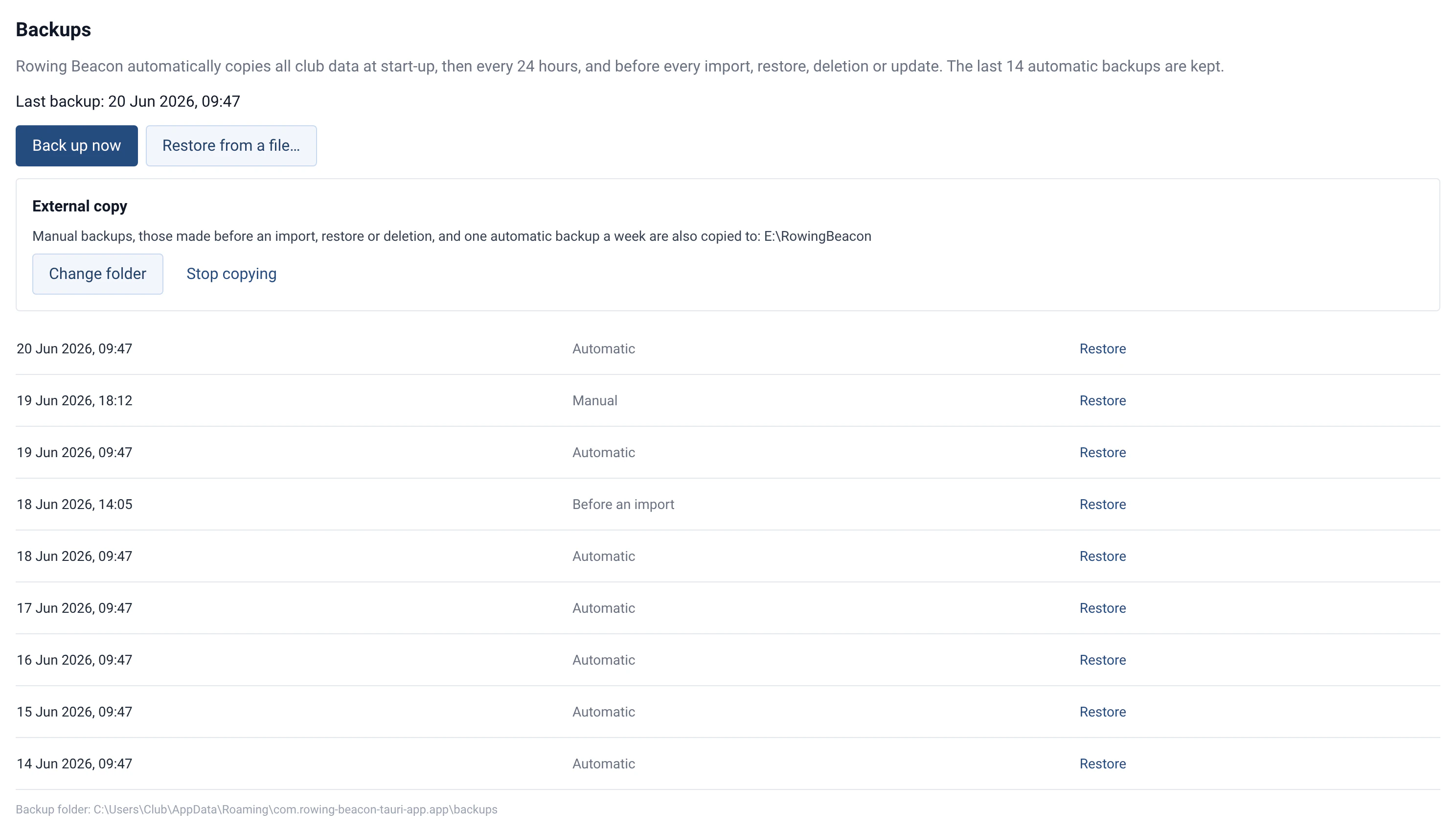
“Rowing Beacon automatically copies all club data at start-up, then every 24 hours, and before every import, restore, deletion or update. The last 14 automatic backups are kept.”
In the app
“Backups stay on this computer. Choose a USB key or a synced folder (Drive, Dropbox…) so they survive a computer failure.”
How to use it
- Day to day, nothing to do. Management › Data shows the date of the “Last backup” and the folder where they are kept.
- External copy, once: “Choose a folder” on a USB key or in a synced folder (Drive, Dropbox…). Manual backups, those made before an import, a restore, a deletion or an update, and one automatic backup a week are copied there.
- On demand: “Back up now”, for example before an important data entry or at the end of the season.
- Restore: the “Restore” button in the list of backups, or “Restore from a file…” for a backup from another computer. The current state is backed up just before, then the app restarts.
Limits and details
- Without an external copy, backups are on the same disk as the data: they do not protect against the computer failing.
- Only automatic backups are limited to the last 14. Manual backups and those made before an operation are never deleted automatically: to keep the state of the end of a season, use “Back up now”.
- The deletion the app refers to is “Delete all data”, in Management › Miscellaneous settings, among the sensitive actions. If the backup fails, nothing is erased. To erase the data for good, delete the files in the backup folder too.
- Before a new version is installed, a “Before an update” backup is made and, if it fails, nothing is installed. See Automatic updates.
- A backup made by a newer version of RowingBeacon can only be restored after the app has been updated.
- When moving from v1 to v2, the data is migrated automatically to the new database. A safety copy is kept for 90 days.
- To set up only the club’s list (rowers, boats, routes) on another computer, use the configuration export. See Rowers, boats and routes.